SoapStone: Creating Undistracted Space for Reflection
Client project
Interaction design / Content organization
Capturing and revisiting personal reflections on scripture.

Overview
SoapStone is a scripture journaling application for capturing, organizing, and revisiting personal reflections. As lead designer, I defined the experience from writing an individual entry to managing a growing journal, with an emphasis on focused writing, private content, and ownership of personal data.
The Challenge
The application needed to support a consistent reflection habit without making journaling feel like managing software. Writing had to remain the primary activity, while organization, formatting, search, sharing, and account controls remained available when needed.
Context + Constraints
Journal entries can contain deeply personal content, making privacy and control central to the experience. Entries are private by default, with sharing enabled individually. The design also needed to work across devices and accommodate different ways of revisiting a journal: reading recent entries, finding a topic, or exploring a particular date.
Key Design Decisions
Markdown formatting keeps the editor visually quiet, although it asks users to learn a small amount of syntax. Automatic saving removes a recurring interruption from the writing process. List, day, and calendar views offer different paths into the same content, while templates support repeatable study formats without requiring every entry to follow a fixed structure.
Implementation + Collaboration
I led workflow design, interaction design, prototyping, visual design, and usability refinement through iterative feedback. The experience combines email-link sign-in, a focused editor, tagging, date-based navigation, and entry-level sharing controls. Journal-inspired typography and ruled-page styling give the reading experience a personal character. Settings include reusable templates, JSON and Markdown exports, and an action to make all shared entries private.
The "So What"
The resulting experience supports the full journal lifecycle: begin a reflection, write and organize it, return to it later, and decide whether to share or export it. The design illustrates how a focused interface can accommodate substantial functionality when secondary controls appear in the context where they are useful.

Sign-In and Entries List
Users sign in using a magic email link, removing the need for a traditional account creation process. Returning users are presented with their journal entries in reverse chronological order, displayed as summarized previews with associated tags. From here, users can create new entries, search by tag, and switch between multiple viewing modes.

Day View & User Menu
The Day View displays all journal entries created on the selected date, providing a focused look at daily reflections. Users can also access account and application settings through the user menu.

Month View
The Month View presents a year-by-year calendar showing which dates contain journal entries. This visualization makes it easy to track writing habits and maintain consistent journaling streaks over time.
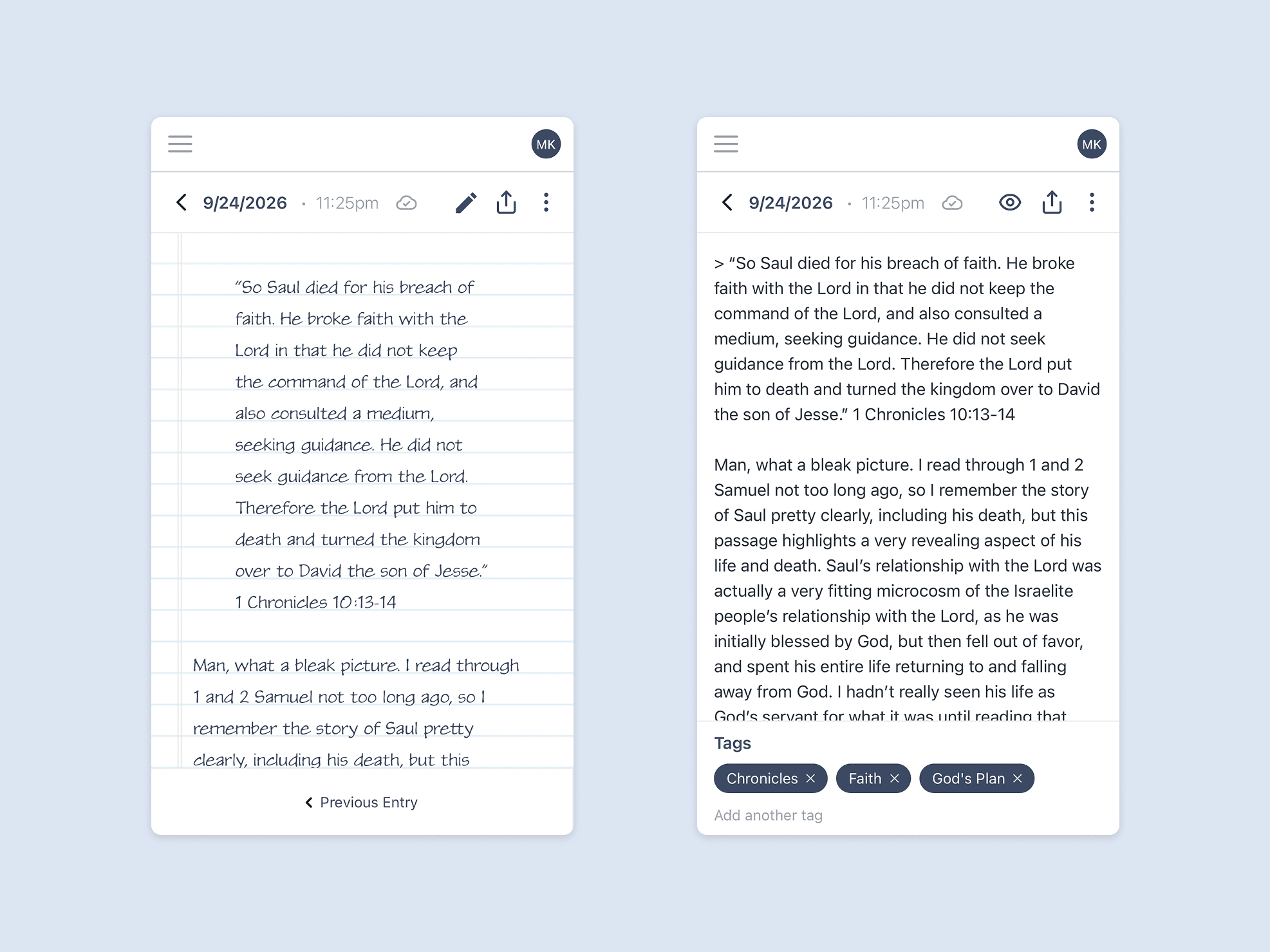
View & Edit Entry
The entry editor serves as the core of the application, providing a distraction-free writing experience focused on thoughtful reflection. Markdown formatting is used in place of traditional rich-text controls to keep the interface clean and uncluttered. Entries are automatically saved as users write and can be tagged for organization and future discovery. When viewed, entries are styled to resemble pages from a handwritten journal.

Entry Modal Controls
Entries are private by default and accessible only to their author. Users can update entry dates and times, generate shareable links for individual entries, or use their device’s native sharing capabilities to distribute content.

Data Settings
SoapStone gives users complete ownership of their journal data. Entries can be exported at any time in both JSON and Markdown formats, and all previously shared entries can be made private with a single action. Users can also create reusable entry templates or choose from built-in templates to streamline future journaling sessions.
All selected work